https://www.youtube.com/watch?v=kWiCuklohdY
모듈
“관련된 변수, 함수, 클래스 등을 모아놓은 파이썬 파일(.py)”
theatre_price.py 에 아래 코드를 저장
def price(people):
    print(f"{people}명의 총 영화값은 {people * 10000}원 입니다.")

def price_morning(people):
    print(f"{people}명의 총 조조 영화값은 {people * 6000}원 입니다.")

def price_soldier(people):
    print(f"{people}명의 총 군인 할인 영화값은 {people * 5000}원 입니다.")
[모듈 안에 있는 함수를 사용할 수 있는 방법]
1. import 모듈명
import theatre_price

theatre_price.price(3)
theatre_price.price_morning(4)
theatre_price.price_soldier(5)
2. import 모듈명 as 지칭단어
as를 사용하여 더욱 간단하게 사용
import theatre_price as mv

mv.price(3)
mv.price_morning(4)
mv.price_soldier(5)
3. from 모듈명 import 특정 함수
특정 함수만 불러옴
아래 코드에서는 price 함수만 불러온 것 이므로 => price_morning / price_soldier 의 함수는 사용 불가
from theatre_price import price
price(3)
price_morning(4)  #error
price_soldier(5)  #error
4. from 모듈명 import *
* : 전체 모두
=> 즉, 저장되어있는 모든 함수 사용
from theatre_price import *
price(3)
price_morning(4)
price_soldier(5)
| 구문 | 설명 | 함수 호출 시 형태 |
| import theatre_price | 모듈 전체를 불러옴 | theatre_price.price() |
| import theatre_price as mv | 모듈에 별칭 부여 | mv.price() |
| from theatre_price import price | 특정 함수만 불러옴 | price() |
| from theatre_price import * | 모듈 내 모든 함수 불러옴 | price() |
import theatre_price
“모듈을 통째로 내 프로그램 안으로 들여옴.”
→ 모듈 안의 함수들은 여전히 모듈의 이름공간(namespace) 안에 있기 때문에 접근할 때 모듈명.함수명() 형태로 써야 함.
from theatre_price import *
“모듈 안의 함수들을 내 코드의 이름공간으로 직접 복사해 옴”
→ 이미 내 코드의 전역 공간에 있으므로 바로 함수명() 가능.
as 는 from 뒤의 모듈명에만 붙일 수 있는 것이 아니라 import 뒤 함수명에도 가능
즉, 아래 코드에서는 price_soldier라는 함수를 price로 불러서 사용 => 군인 할인 가격으로 출력
from theatre_price import price_soldier as price
price(3)   #군인할인 가격으로 출력
패키지
패키지(package) = 여러 개의 모듈을 묶어둔 폴더
- 모듈: 하나의 .py 파일
- 패키지: 여러 모듈이 들어 있는 폴더 구조
패키지를 만들기 위해 folder를 만들고, thailand.py 와 vietnam.py, __init__.py 생성
__init__.py 파일이 반드시 있어야 함 (이 파일이 있어야 폴더가 패키지로 인식됨)
→ 비어 있어도 상관없음.
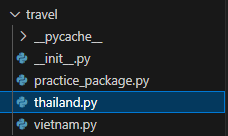
각각의 모듈에 class 생성
class VietnamPackage:
    def detail(self):
        print("[베트남 패키지 여행 3박 5일] 다낭 효도 여행 60만원")
그 이후, 다른 file에서 import 하여 패키지 불러들일 수 있음
import travel.vietnam

trip_to = travel.vietnam.VietnamPackage()
trip_to.detail()
위 코드 외에 from 패키지.모듈명 import 함수명
방식으로도 사용 가능
from travel.vietnam import VietnamPackage

trip_to = VietnamPackage()
trip_to.detail()
PIP
pip를 통해 설치/확인/업그레이드/삭제 가능
- pip install 패키지명 : 설치 (pypi 홈페이지에서 패키지 확인가능)
- pip list : 설치된 패키지 확인 가능
- pip show 패키지명 : 패키지에 대한 설명 (라이센스, 어디 경로에 위치, 웹사이트 등)
- pip install --upgrade 패키지명 : 설치되어있는 패키지가 업그레이드 필요할 경우
- pip uninstall 패키지명 : 삭제
terminal 에 pip install beautifulsoup 4 입력해서 설치했는데, 자꾸 작동이 안되고 module이 없다고 해서 진땀 뻘뻘했음
알고보니 python 버전은 3.14인데 그냥 pip install beautifulsoup4로 설치하다보니 3.11에 설치되었다고 함
그래서 chat gpt가 아래처럼 python을 지정해서 설치하는게 좋다고 함.
| 명령어 | 장점 | 주의점 |
| pip install beautifulsoup4 | 간단함 | 어떤 파이썬에 설치되는지 모를 수 있음 |
| python -m pip install beautifulsoup4 (C:\Python314\python.exe -m pip install beautifulsoup4) |
환경 명시 가능 → 오류 방지 | 조금 길지만 안전함 |
내장함수
imput = 사용자 입력 받기
#imput : 사용자 입력 받는 함수
language = input("무슨 언어를 좋아하세요?")    #파이썬 입력
print(f"{language} 좋아합니다.")             #파이썬 좋아합니다.
dir = 객체가 가진 속성/메서드 확인
num; 리스트에 사용될 수 있는 변수, 함수 확인 가능
name 에 사용될 수 있는 변수, 함수 확인 가능
#dir : 어떤 객체를 넘겨줬을 때 그 객체가 어떤 변수와 함수를 가지고 있는지 표시
num = [1, 2, 3]
print(dir(num))
#['__add__', '__class__', '__class_getitem__', '__contains__', '__delattr__', '__delitem__',
# '__dir__', '__doc__', '__eq__', '__format__', '__ge__', '__getattribute__', '__getitem__',
# '__getstate__', '__gt__', '__hash__', '__iadd__', '__imul__', '__init__', '__init_subclass__',
# '__iter__', '__le__', '__len__', '__lt__', '__mul__', '__ne__', '__new__', '__reduce__', '__reduce_ex__',
# '__repr__', '__reversed__', '__rmul__', '__setattr__', '__setitem__', '__sizeof__', '__str__', '__subclasshook__',
# 'append', 'clear', 'copy', 'count', 'extend', 'index', 'insert', 'pop', 'remove', 'reverse', 'sort']

name = "Donna"
print(dir(name))
# ['__add__', '__class__', '__contains__', '__delattr__', '__dir__', '__doc__', '__eq__', '__format__', '__ge__',
# '__getattribute__', '__getitem__', '__getnewargs__', '__getstate__', '__gt__', '__hash__', '__init__', '__init_subclass__',
# '__iter__', '__le__', '__len__', '__lt__', '__mod__', '__mul__', '__ne__', '__new__', '__reduce__', '__reduce_ex__', '__repr__',
# '__rmod__', '__rmul__', '__setattr__', '__sizeof__', '__str__', '__subclasshook__', 'capitalize', 'casefold', 'center',
# 'count', 'encode', 'endswith', 'expandtabs', 'find', 'format', 'format_map', 'index', 'isalnum', 'isalpha', 'isascii',
# 'isdecimal', 'isdigit', 'isidentifier', 'islower', 'isnumeric', 'isprintable', 'isspace', 'istitle', 'isupper', 'join',
# 'ljust', 'lower', 'lstrip', 'maketrans', 'partition', 'removeprefix', 'removesuffix', 'replace', 'rfind', 'rindex', 'rjust',
# 'rpartition', 'rsplit', 'rstrip', 'split', 'splitlines', 'startswith', 'strip', 'swapcase', 'title', 'translate', 'upper', 'zfill']
내장함수 검색 방법:
구글에 "list of python builtins" 검색 > 가장 위에 있는 사이트 접속 > 언어 변환 (ENG -> KOR) > 내장 함수 확인 가능
https://docs.python.org/ko/3.14/library/functions.html
Built-in Functions
The Python interpreter has a number of functions and types built into it that are always available. They are listed here in alphabetical order.,,,, Built-in Functions,,, A, abs(), aiter(), all(), a...
docs.python.org

###### 내장 함수와 외장 함수의 차이점 #####
| 구분 | 내장함수 | 외장함수 |
| 설치/준비 | 필요 없음 | 모듈 import 필요 |
| 예시 | print(), len(), input() | math.sqrt(), random.randint() |
| 용도 | 기본적인 기능 | 특수 기능, 복잡한 연산, 특정 분야 기능 |
| 장점 | 바로 사용 가능 | 강력하고 다양한 기능 제공 |
외장 함수
외장함수는 내장함수와 다르게 직접 import 해서 사용해야하는 것
- 외장함수라고 해서 무조건 pip로 설치해야 하는 것은 아님
- 파이썬에 기본으로 포함된 모듈 → 표준 라이브러리 (설치 필요 없음)
예: os, glob, datetime, math, random 등 - 외부 개발자가 만든 모듈 → 외부 라이브러리 (설치 필요)
예: requests, numpy, pandas
- 파이썬에 기본으로 포함된 모듈 → 표준 라이브러리 (설치 필요 없음)
즉: 표준 라이브러리: import만 하면 됨
외장함수 검색 방법:
구글에 "list of python modules" 검색 > 가장 위에 있는 사이트 접속 > 언어 변환 (ENG -> KOR) > 내장 함수 확인 가능
https://docs.python.org/3/py-modindex.html
Python Module Index — Python 3.14.0 documentation
numbers Numeric abstract base classes (Complex, Real, Integral, etc.).
docs.python.org
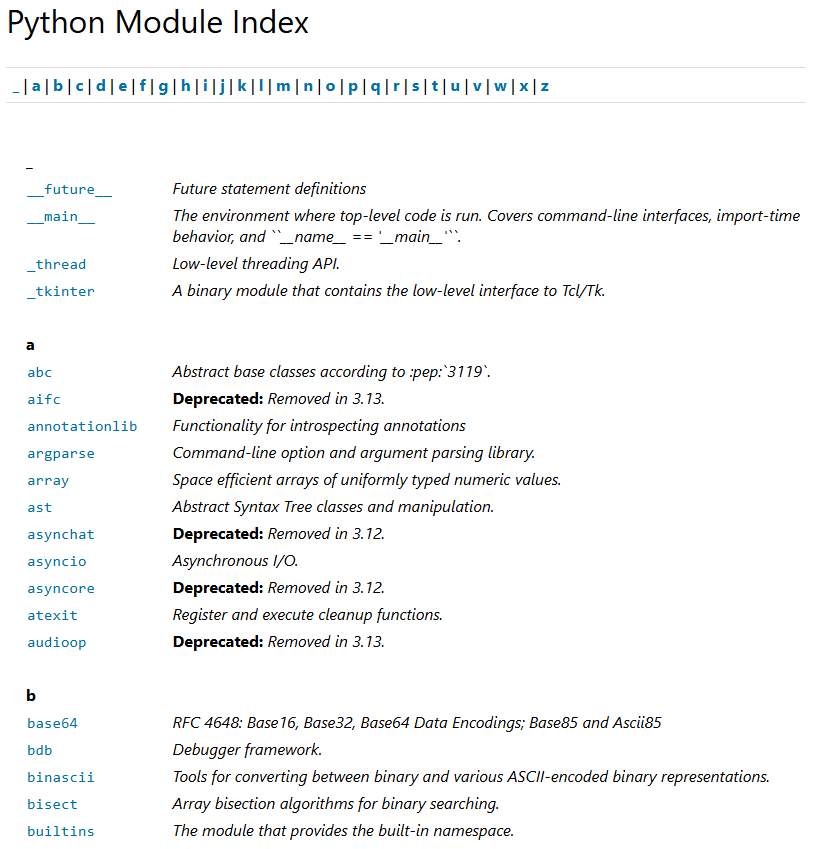
외장함수 중 몇 개 예시
1. glob
- 특정 패턴(와일드카드)과 일치하는 파일명을 찾아주는 모듈
- 특징:
- *, ? 같은 패턴 지원
- 파일 검색에 특화
# glob : 경로 내의 폴더 / 파일 목록 조회 (윈도우 dir)
import glob
print(glob.glob("*.py"))   #확장자가 py 인 모든 파일의 결과를 알려줘
#값 : ['helloworld.py', 'practice.py', 'practice_class.py', 'quiz_class.py', 'StarCraft.py', 'theatre_price.py']
#(내가 컴퓨터 내 저장해놓은 py 파일 모두 출력)
2. os
- 운영체제(OS)와 상호작용할 수 있는 함수 모음
- 특징:
- 파일/폴더 생성, 삭제, 경로 조작 가능
- 환경 변수 접근 가능
os.getcwd() : 현재 작업하고 있는 경로 출력
os.path.exists(folder) : 폴더가 있는지 확인
os.rmdir(folder) : 폴더 삭제
os.makedirs(folder) : 폴더 생성
os.listdir() : 경로 내에 있는 파일 출력 (glob과 같이 작용)
# os : 운영체제에서 제공하는 기본 기능
import os
print(os.getcwd()) #현재 디텍토리를 표시해줘
# 값 : C:\Users\Administrator\Desktop\PythonWorkspace
# (이 경로에서 작업하고 있다는 의미)

folder = "sample_dir"

if os.path.exists(folder): #sample_dir 폴더가 있으면 이 구문을 타라
    print("이미 존재하는 폴더 입니다.")
    os.rmdir(folder) #폴더 삭제
    print(folder, "폴더를 삭제하였습니다.")
else:
    os.makedirs(folder) #폴더 생성
    print(folder, "폴더를 생성하였습니다.")
====================================
print(os.listdir())
# 값: ['.vscode', 'helloworld.py', 'practice.py', 'practice_class.py', 'profile.pickle',
'quiz_class.py', 'score.txt', 'sparta', 'StarCraft.py', 'study.txt', 'theatre_price.py',
'travel', '__pycache__']
3. time
- 시간과 관련된 함수 제공
- 특징:
- 현재 시간 확인
- 시간 지연(sleep) 가능
- 타임스탬프 처리 가능
#time : 시간 관련 함수
import time
print(time.localtime())
#현재 시간
# #값: time.struct_time(tm_year=2025, tm_mon=10, tm_mday=15, tm_hour=22, tm_min=26, tm_sec=13, tm_wday=2, tm_yday=288, tm_isdst=0)
print(time.strftime("%Y-%m-%d %H:%M:%S"))
#현재 시간인데 더 보기 쉽게 변경
# #값: 2025-10-15 22:26:13
4. datetime
- 날짜와 시간을 쉽게 다룰 수 있는 모듈
- 특징:
- 날짜/시간 생성, 계산, 포맷 변환 가능
- date, time, datetime, timedelta 등 다양한 클래스 제공
import datetime
print("오늘 날짜는", datetime.date.today())  #값: 오늘 날짜는 2025-10-15

# timedelta : 두 날짜 사이의 간격
today = datetime.date.today()  #오늘 날짜 저장
td = datetime.timedelta(days=100) # 100일 저장
print("우리가 만난지 100일은", today + td) #오늘부터 100일 후
#값 : 우리가 만난지 100일은 2026-01-23
'공부 & 프로젝트 > 파이썬' 카테고리의 다른 글
| [파이썬] 웹스크래핑 기초 2: Requests, 정규식, User Agent (0) | 2025.10.17 |
|---|---|
| [파이썬] 웹스크래핑 기초 1: html, xpath, 크롬 (0) | 2025.10.17 |
| [파이썬] 예외 처리- Try, Except, Raise (0) | 2025.10.15 |
| [파이썬] Class : init, 메소드, 상속, 다중상속, 메소드 오버라이딩 (1) | 2025.10.15 |
| [파이썬] 문자열 포맷 (0) | 2025.10.11 |


